Procurement Cost Analysis Report Guide
How to read your Procurement Cost Analysis
This guide explains what the report contains, how each section works, and what to do with the findings.
Looking for the quote normalization guide? Read the quote analysis guide →
On this page
1. What this report shows
The Procurement Cost Analysis report analyzes 12 months of your actual purchase order and invoice history (not vendor quotes) to show you how your material prices have moved over time, where you may be overpaying, and what actions are worth taking before your next purchasing cycle.
The report covers the materials that make up the largest portion of your ingredient spend. For each one, it shows volume patterns, price trends, and a specific recommendation on what to do next.
2. The Executive Brief
The top-level summary at the start of the report
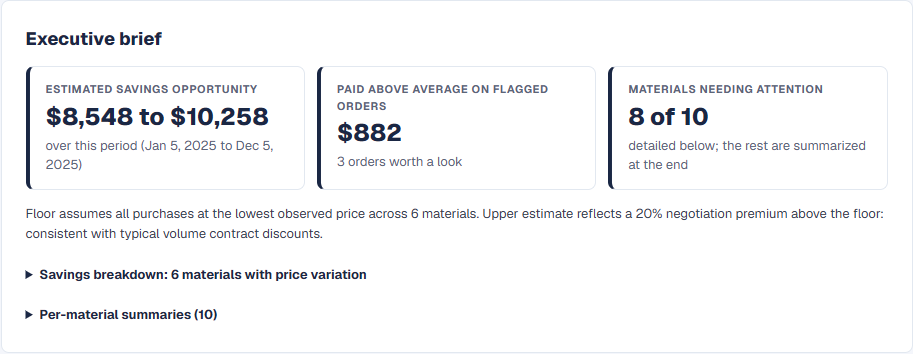
The Executive Brief appears at the top of the report and leads with up to three headline numbers: the savings opportunity range over the review period, what flagged orders cost above the period average, and how many materials need attention. The breakdown and per-material summaries sit below as expandable sections.
3. Priority Actions
A ranked list of specific things to do before your next purchasing cycle
Priority Actions are ranked by the dollar value at stake. The main types:
Prices rising: consider a larger next order
Prices rose over the period. If cash and shelf life allow, a somewhat larger next order buys ahead of the trend.
Prices falling: consider a smaller next order
Prices fell over the period. A somewhat smaller next order avoids building inventory while they settle.
Above-average price: check how an order was priced
A specific order was priced well above the period average. Small, rush or spot orders often carry a premium; if none of those applies, it is worth asking the vendor how it was priced.
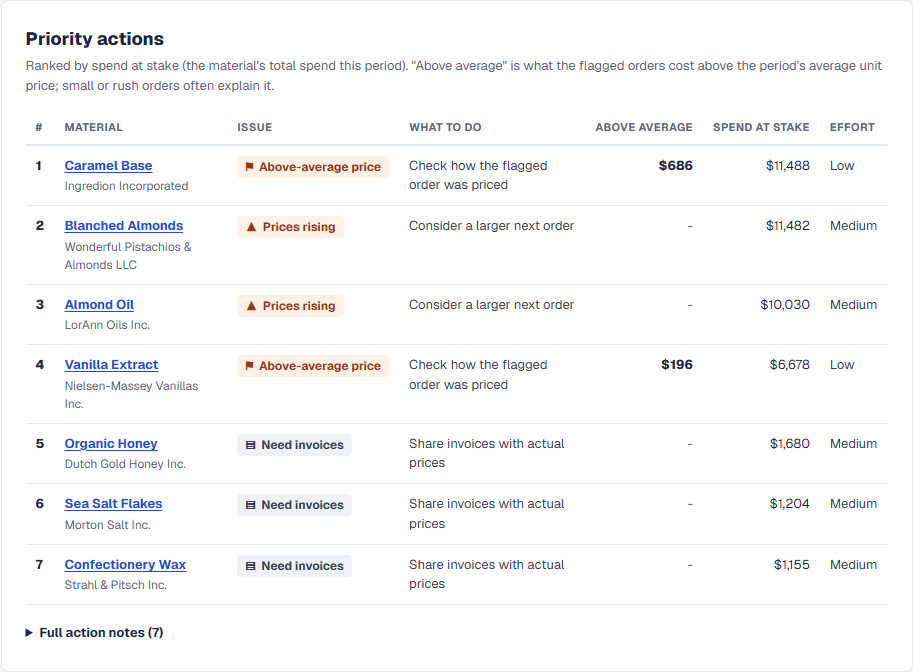
The actions appear as a table: the material and vendor, the issue, what to do, how far flagged orders came in above the period average (for flagged-order checks), the material's total spend, and the effort. Click a material name to jump to its card. The full wording of each action is under “Full action notes” below the table.
4. Material Cards
One card per material: trend, chart, and recommendation
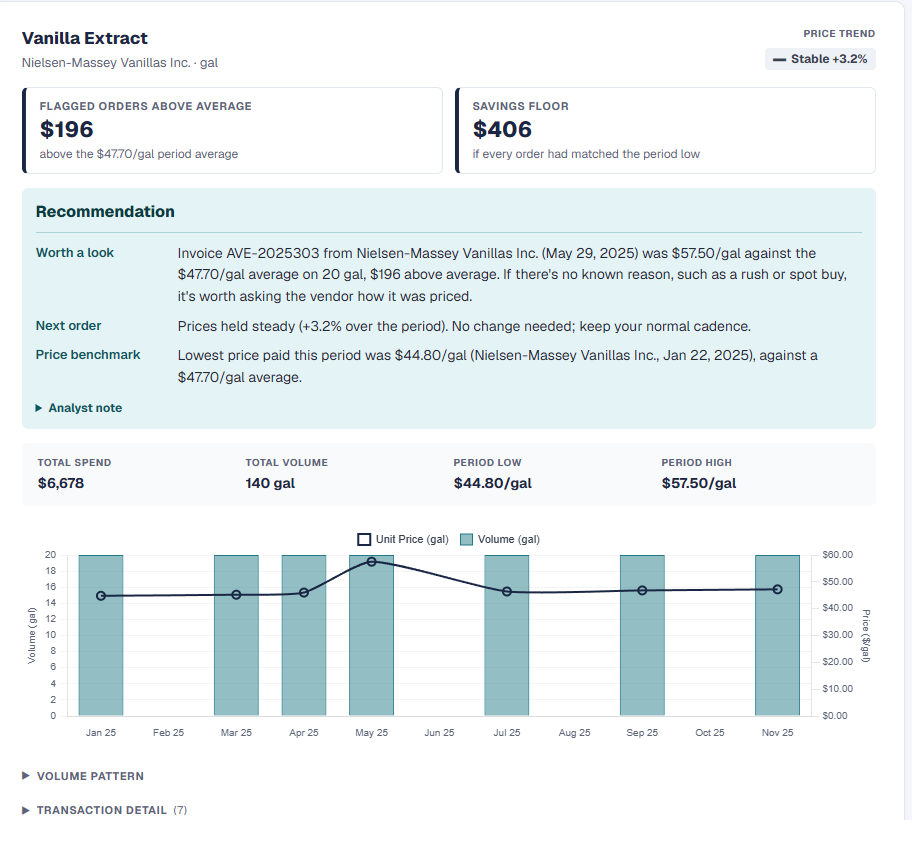
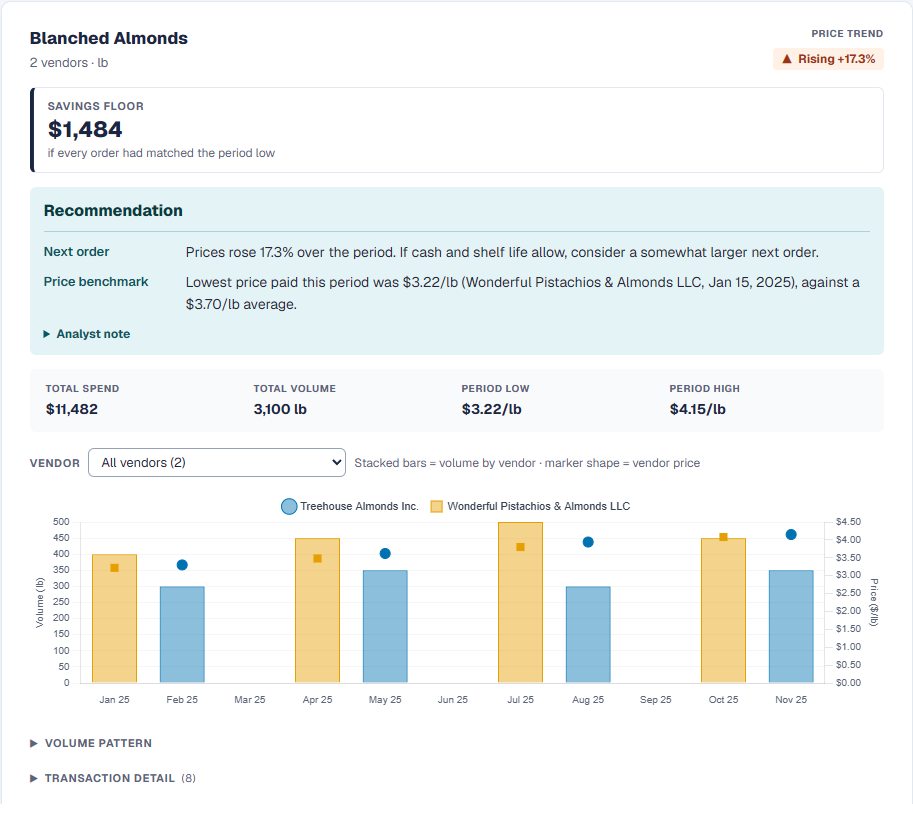
After the Priority Actions, the report shows a full card for each material needing attention: one with a savings opportunity, a flagged order, or a priority action. Each card leads with its key numbers and a step-by-step recommendation, then stats and a price/volume chart. Every other material is listed once under “Other materials” with its spend and trend; open any of them to see the same card.
Trend badge
For materials with invoice prices, the badge shows the price trend over the review period; for standard-cost materials it shows the volume trend, and the label above the badge says which. Rising and falling are directional. Volatile means significant swings with no clear trend. Stable means flat or nearly flat. Each badge carries a symbol and a word, so it reads the same without color.
5. How savings are calculated
Every savings figure in the report is calculated the same way: it asks what your total spend would have been if every purchase had been made at the lowest price observed for that material during the review period. That is the floor estimate.
The upper estimate in the Executive Brief adds a 20% negotiation premium on top of the floor; the idea being that in practice, a supplier negotiation might achieve prices below the floor by a further margin. The 20% is a general benchmark, not a guarantee.
The Assumptions & Notes section at the bottom of the report documents exactly how each figure was calculated, including which materials were included in the transactional floor and which were excluded because they only have standard cost data.
6. What to do next
A practical order for working through the Priority Actions:
- Rising-price materials: timing matters most here, so look at these before the next order.
- Falling-price materials: on your next normal order cycle.
- Above-average orders: sooner is easier, while the order is recent.
- Invoices for standard-cost materials: sharing them makes price review possible in a future engagement.